
Definitive guide · 100% free
BetOven Scanner: the definitive guide
BetOven Scanner is BetOven's free surebet and valuebet finder. It uses the same search engine as its automatic robot to show you, in real time and across more than 80 bookmakers, where the opportunities are. You place the bets yourself.
For Windows and Mac · Free · Installs in 2 minutes.
What is BetOven Scanner?
If you have done surebets (sports arbitrage) or value bets manually, you know how tedious it is to compare odds across dozens of bookmakers before the opportunity disappears. BetOven Scanner does that search for you.
It is a free software that analyses the odds of the main bookmakers in real time and tells you, instantly, where there is a surebet or a valuebet. It does not place the bets for you —that is what the automatic BetOven robot does—, but it saves you all the detection work.
1. Installing BetOven Scanner
Installation is quick and guided: you download the Scanner and follow the instructions you will see right after signing up. It will be running in a couple of minutes, with no complicated steps.
Download BetOven Scanner for free here and, once you finish the form, you will get the link and the install command for your operating system.
- Available for Windows and Mac. Pick your system and follow the install command we give you; there is nothing else to set up.
- Minimal resource usage. It is a lightweight app: you can keep it open all day while you work with the bookmakers without slowing your computer down.
- Ready in a couple of minutes. Guided install, with no dependencies to install on your own.
2. Creating an account in BetOven Scanner
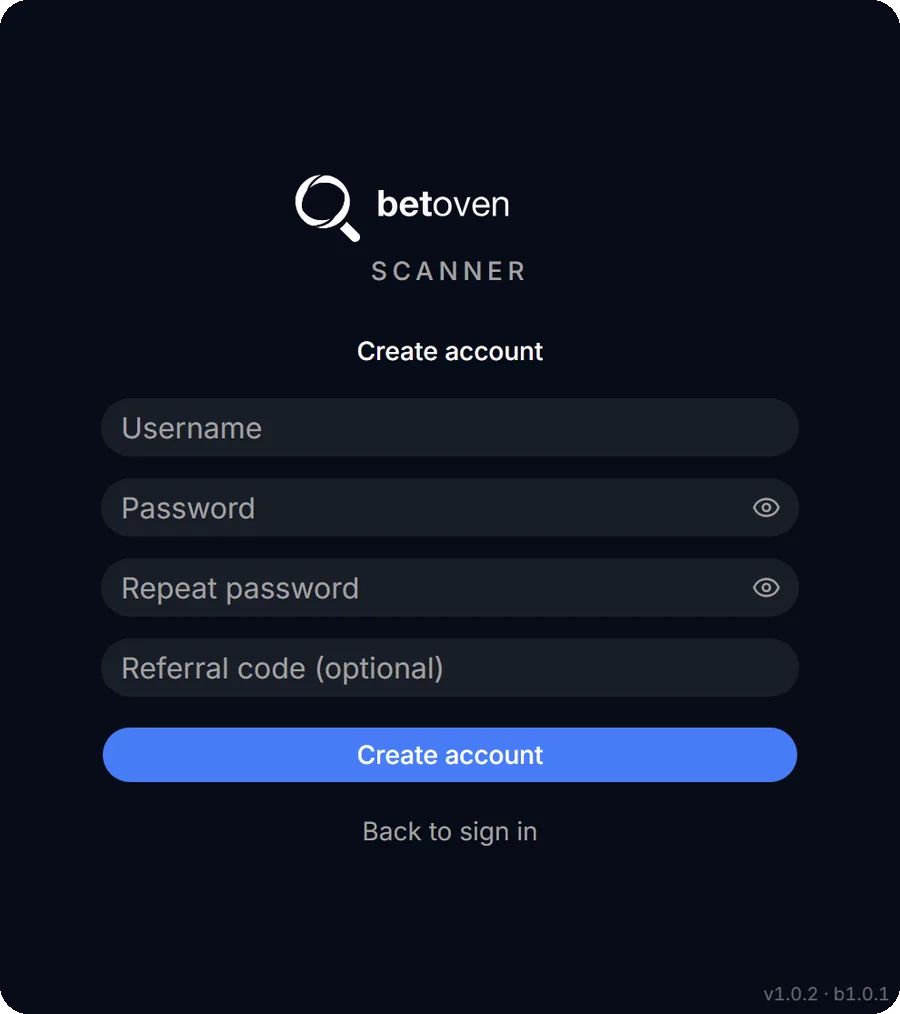
When you open BetOven Scanner for the first time you will see the login screen, with the option to log in with your username and password or to create an account if you do not have one yet.
If you click Create account, you will choose a username and a password (and repeat it). There is also a field for a referral code, which is optional: if you do not have one, leave it blank. Once the account is created, go back to the initial screen and log in to start using the Scanner.
3. How BetOven Scanner works
Once inside, the Scanner is organised into two big blocks: configuration (surebets and valuebets) and viewing (surebets and valuebets). In the configuration you define the filters that decide which surebets and valuebets you want to see; the viewers then show, live, the ones that match those filters.
4. Configuring surebets
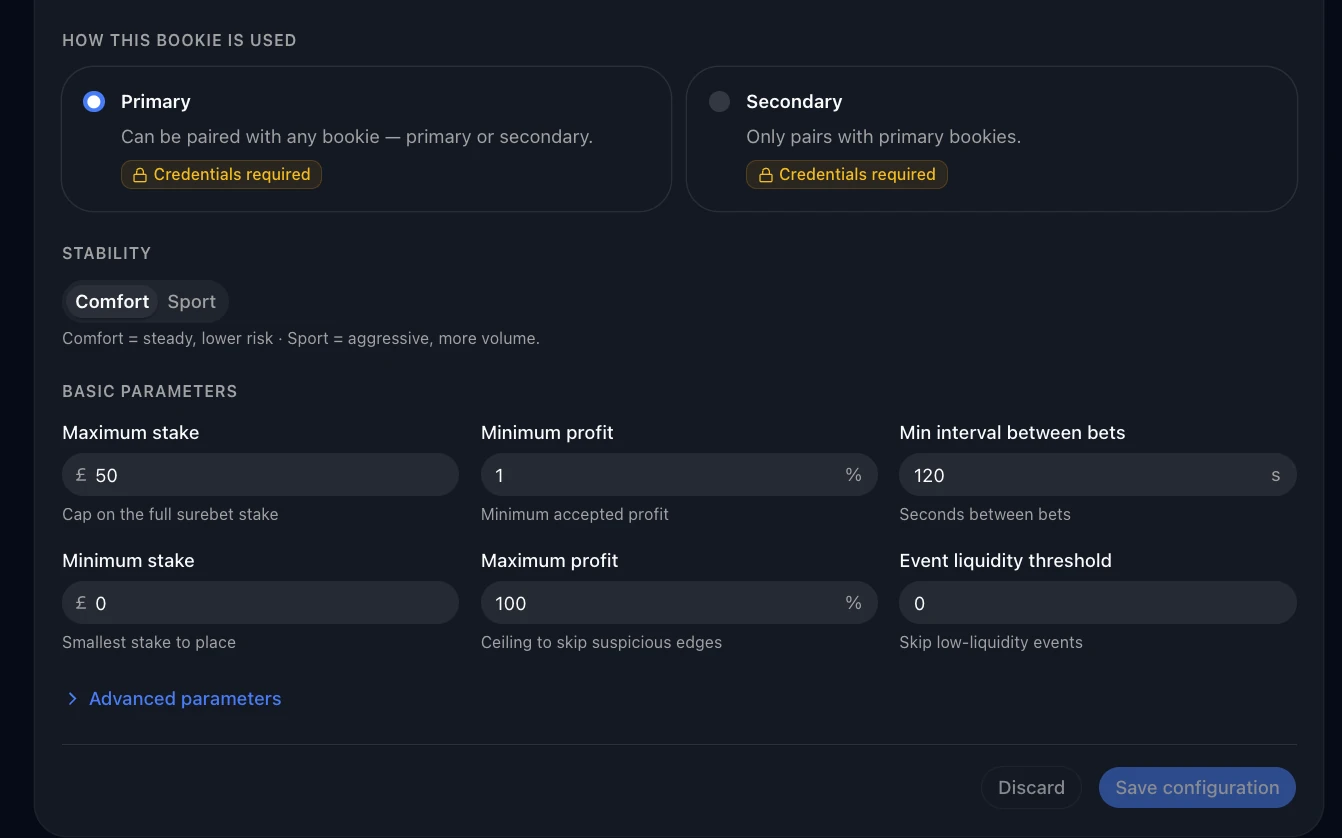
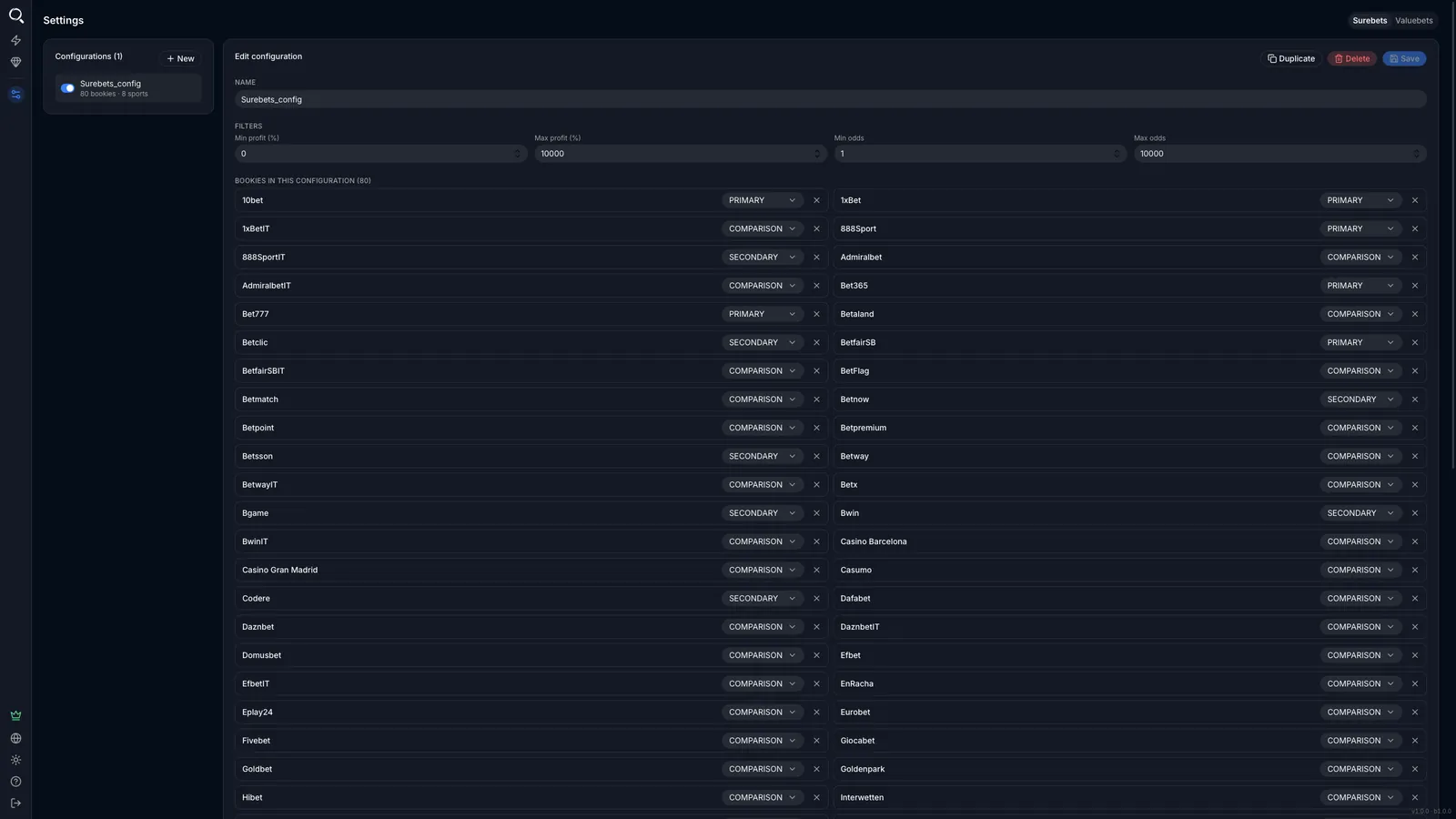
Creating a configuration is a guided 5-step wizard. There is no mystery to it: you name it, decide what role each bookmaker plays and pick the sports. This is what each configuration defines:
- Name — to identify it among your saved configurations.
- Profitability and odds filters — minimum and maximum profitability (in %) and minimum and maximum odds of the bets that make up the surebet.
- Role of each bookmaker — the most important block, explained just below.
- Sports — you only enable the ones you care about.
4.1 The three bookmaker states
This is what shapes your results the most. Each bookmaker in the list is marked with one of these three states (they appear in English inside the app):
PRIMARY
Main bookmaker. It can be part of any surebet and appears in the odds comparator. These are your reference bookmakers, the ones you always bet at.
SECONDARY
Secondary bookmaker. It can form surebets, but only combined with a PRIMARY bookmaker: surebets between two secondaries are not allowed. Useful for bookmakers you use less or where your account is limited.
COMPARISON
Comparison only. It does not form surebets, but its odds do appear in the comparator, so you can see where the best odds in the market are.
This is how you really control the output: if you mark few bookmakers as PRIMARY, you will see fewer surebets but all of them at bookmakers where you can actually bet.
4.2 Available sports
The Scanner covers 8 sports and you enable the ones you want (there are shortcuts to select all or none): football, tennis, basketball, handball, volleyball, table tennis, hockey and baseball. You will only see surebets from the sports you have enabled.
Once created, the configuration appears in your list and you can enable, disable, edit or delete it whenever you want. Only active configurations count: if a surebet meets the conditions of one of them, it already shows up in the viewer.
5. Configuring valuebets
The valuebet configuration is practically the same as the surebet one —same wizard, same odds filters and same sports—, with two differences worth knowing:
- There are no primary or secondary bookmakers. Since a valuebet is a single bet (not a combination), each bookmaker is simply active or not, plus the comparison mode.
- Profitability is the yield. In surebets the percentage is the guaranteed profit; in valuebets it is the theoretical profitability —its expected value as a percentage—, that is, what that bet should return in the long run.
6. Surebet viewer
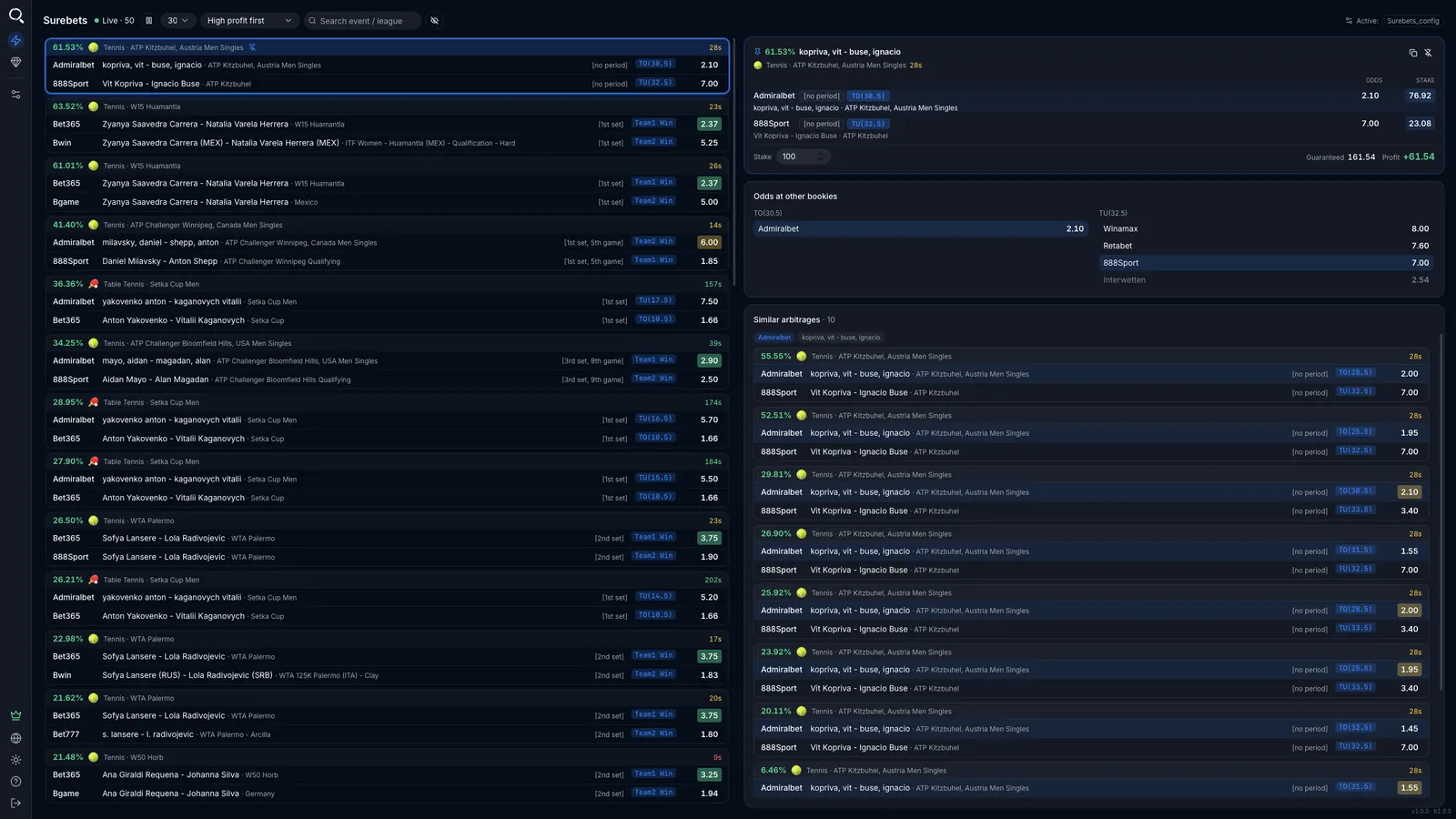
The surebet viewer shows the surebets that exist right now in the bookmakers you have selected, already filtered by your configuration. They update on their own: new ones appear and ones that stop existing disappear. You can sort them by profitability or stability (Arbs sorted by) and pause the refresh with Pause Auto-Refresh.
6.1 Pin a surebet and apply filters
Click a surebet to pin it to the top, so it does not move with the automatic refresh (its data still updates). With a surebet pinned you can apply filters at event, period or market level: the surebets matching the filter are grouped separately, so you can work comfortably on the same event.
6.2 Odds comparator
On a pinned surebet, the odds comparator shows you how those same bets look at the other bookmakers (“Odds at other bookmakers” panel). You see at a glance where the best odds are without leaving the Scanner.
6.3 Value indicators
The value indicators highlight in colour which of the two bets in the surebet is the one with value (odds higher than they should be given its real probability). The colour does not indicate more or less value, but the reliability of the calculation: from most to least reliable, dark green, light green and yellow. If no bet is highlighted, it means value could not be determined reliably enough.
6.4 Hide a market or event
Right-click a market and Hide this market to tell the Scanner you do not want to see surebets from that market; doing it on the event name hides the whole event. What you hide stays hidden during the session; closing and reopening the Scanner brings it back.
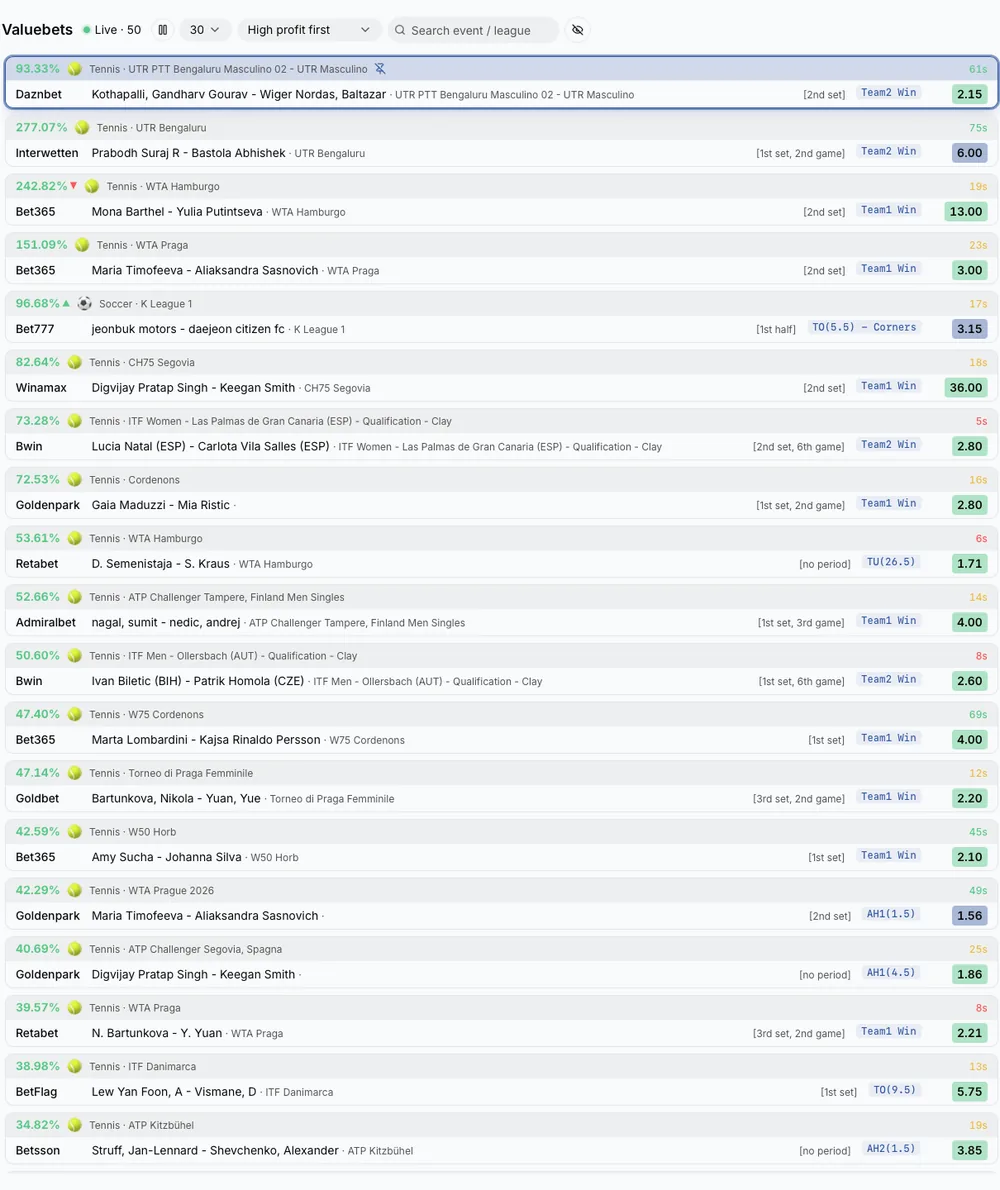
7. Valuebet viewer
The valuebet viewer works just like the surebet one, with one difference: where the surebets show the profit margin, the valuebets show the yield —the theoretical profitability of the valuebet, calculated as its expected value in percentage—. Everything else (sorting, automatic refresh, pinning, filters) is identical.
8. From the Scanner to the Robot: take the leap
You now know BetOven Scanner and all its configurations. The Scanner tells you where the opportunities are, but you still place the bets by hand. When you want to stop doing that, the BetOven robot places them for you, faster than you and 24/7, across several bookmakers at once and with no emotional factor.
The best way to understand it is to try it with your own bookmakers. See it in action:
Frequently asked questions about BetOven Scanner
Is BetOven Scanner free?
Yes, BetOven Scanner is 100% free. It is BetOven’s surebet and valuebet finder: it shows you the opportunities in real time so you can place them yourself. If you want them executed automatically, that is the automatic robot, which is paid.
Is it hard to install?
No. The install is guided and takes a couple of minutes: you download the Scanner and follow the instructions for your system. No technical steps or complicated setup.
Does it work on Mac?
Yes. BetOven Scanner has a native Mac version, in addition to Windows. Virtual machines are no longer needed.
How many bookmakers does it cover?
More than 80 bookmakers. The Scanner crosses their odds in real time to find surebets and valuebets.
What is the difference between the Scanner and the Robot?
The Scanner detects the opportunities and tells you where to bet, but you place the bets. The Robot does the whole process automatically, placing the bets for you 24/7.
Do I need previous experience?
Knowing surebets or valuebets helps, but it is not essential: you get the BetHunter academy for free and the team’s support to get started.
Download BetOven Scanner for free
Start finding surebets and valuebets in real time, across more than 80 bookmakers, at no cost.
For Windows and Mac · Installs in 2 minutes · 100% free.

Hi! I’m Aitor Hunt. Before I got into sports arbitrage, I was a frustrated industrial engineer: just another cog in a big company, looking for a radical change.
That changed in 2018, when I came across software built by some friends from the Technical University of Madrid (BetOven), based on maths and automation. I was very sceptical at first (like almost everyone), but I started as a customer, tried it and saw how it worked first-hand. That’s how BetHunter was born. Today I’m here to explain how surebets and value bets work and how to automate them with method, knowing that the risk never goes away.